
 Most workflows do not fail because the work itself is difficult. They fail because there is no clear system that guides how the work should move from start to finish.
In many organizations, workflows still move across spreadsheets, chat messages, shared drives, and email. Work progresses, but not in a way that is consistent or visible. Teams rely on memory, reminders, and personal initiative to keep things on track. When key people are unavailable, the workflow slows or becomes unclear.
The issues associated with spreadsheet-based workflows become more noticeable when more people are involved. Coordination increases, but clarity does not. The workflow is not the problem. The system that supports it is missing.
This is where Planally brings structure.
Planally organizes a workflow into the natural phases that work already follows inside a team or organization. Instead of breaking work into tasks on a board, the workflow is shaped into clear stages that show how progress moves forward step-by-step.
When a workflow is structured in phases, everyone understands where the work is, what needs to happen next, and who is responsible. Reviews and approvals move automatically based on activity status. Work does not need to be chased. Progress becomes visible.
This is what turns a workflow into a digital workflow. The workflow becomes the system that guides the work. Not memory. Not follow-ups. Not individual effort.
With Planally, organizations can create no-code workflow applications that make work easier to run, easier to track, and easier to improve. When workflows become apps, teams gain consistency, clarity, and smoother progress across any workflow.
And this leads to an important question:
Why does digitalizing workflows matter now more than ever?
Why Digitalizing Workflows Matters Now
Work has never moved faster. Yet the workflows that support this work often remain unchanged. Teams collaborate across more people, tools, and decisions than before, but the systems guiding that work have not evolved to match this pace.
This creates a quiet form of friction.
Not chaotic. Not obvious.
But present in every follow-up, every reminder, every moment where someone asks, “Where does this stand?”
When workflows rely on memory or personal familiarity, progress depends on who remembers the next step, who has the context, and who is available to move things forward. This works for a while, until the workflow grows, the team expands, or the work becomes more repeatable.
The workflow is not the problem. The absence of a clear system is.
 Digitalization a workflow does not replace human judgment. It replaces uncertainty.
When a workflow becomes a digital workflow, several things become clear:
- The steps are known
- The sequence is defined
- The responsibilities are understood
- The progress is visible
Teams stop requesting updates because the workflow itself communicates the state of the work.
This shift transforms how organizations operate at scale:
| Before Digitalization | After Digitalization |
| Work is moved manually | Work progresses through structured phases |
| Knowledge resides in individuals | Knowledge resides in the workflow |
| Approvals rely on reminders | Approvals move through clear checkpoints |
| Delays are noticed late | Delays become visible as they happen |
Digitalization is not an efficiency tactic.
It is a foundation for consistency, clarity, and repeatable execution.
Leaders gain visibility they can rely on.
Teams know what to do and when to do it.
The workflow runs the same way every time.
Which leads naturally to the next question:
What does it mean to turn a workflow into a digital workflow?
What Is a Digital Workflow?
Most workflows already exist. The challenge is not defining the workflow itself. The challenge is running it in a way that is clear, consistent, and repeatable.
A digital workflow is a structured version of a workflow that guides the work step-by-step, captures the right information at the right moment, and moves progress forward without manual coordination. It turns an existing workflow into a system that can run the same way every time.
Consider a common scenario. A procurement request begins in a spreadsheet, moves to email for approval, shifts into chat for clarification, and then ends up stored in a shared folder. The workflow exists, but the flow depends on memory, reminders, and repeated follow-ups.
A digital workflow replaces this manual movement with a clear sequence of stages. Each stage has defined responsibilities, required inputs, and a checkpoint for approval. Progress moves because the workflow itself carries the work forward, not because someone remembers to push it.
This is the difference between tracking work and running work. Digital transformation succeeds when teams improve how work flows, not just the tools used to track it.
A digital workflow:
- Represents the workflow from beginning to completion
- Structures the workflow into clear phases that show how progress advances
- Captures data, documents, and decisions inside the flow
- Moves work forward through rules, reviews, and approvals
- Makes progress visible to everyone involved
With Planally, organizations can create these workflows without writing code. Workflows are modeled into natural phases using Planally’s phase-based approach. The phase structure becomes the roadmap that shows how work moves from start to finish.
Inside each phase, teams can add forms, tasks, reviews, and supporting documents. Planally’s no-code workflow builder allows information to be captured exactly where it belongs. Automation moves work forward based on the status of activities and approvals.
The workflow does not need to be remembered.
The workflow is built into the system.
Planally enables teams to run any workflow with clarity, consistency, and shared understanding, so progress becomes something the workflow itself maintains.
A digital workflow runs the workflow.
Traditional tools require the workflow to run around the tool.
Why Task Tools Don’t Run Workflows
Most task and project tools were built to help individuals organize work. They create lists, boards, and assignments so people can track what they need to do. These tools work well when the work is personal, short-term, or flexible in sequence.
But organizational workflows do not move as lists.
They move through phases.
 A contract review, an onboarding process, a procurement request — these workflows involve multiple teams, approvals, documents, data points, and timing. The workflow does not depend on one person completing a task. It depends on the workflow moving through a structured sequence.
This is where traditional task and project tools start to fall short.
They can show what is being worked on, but not how the work should progress.
Traditional Task and Project Tools
- Represent work as individual items
- Assume the workflow is flexible and changes often
- Depend on people to move work forward
- Track activity, but not the process itself
Digital Workflow
- Represent work as phases that reflect how it moves in reality
- Assume the workflow is repeatable and worth running consistently
- Move work forward automatically based on decisions and approvals
- Run the workflow, not just the tasks inside it
This is not a difference in interface.
It is a difference in how work behaves.
Task tools require teams to coordinate work around the tool.
A digital workflow ensures the workflow itself provides the direction.
Planally is built for workflows that rely on sequence, handoffs, and decisions. Instead of boards or task clusters, Planally structures workflows so that progress moves through phases, with automation and clarity guiding the flow. The task-level view still exists for teams that need to manage their day-to-day responsibilities, but it is always connected to the phase-level movement of the workflow itself.
In most organizations, the challenge has never been the tasks.
The challenge has always been the structure that connects the tasks.
A digital workflow does not replace task tools.
It provides the system that makes workflows consistent, visible, and easier to run.
Work Moves in Phases, Not Tasks
Work does not move one task at a time.
It moves through stages of progress.
A contract progresses through Initiation, Tendering, Evaluation, Negotiation, Delivery, and Closeout.
A procurement request moves from Request to Sourcing to Approval to Purchase to Receipt to Payment.
An onboarding journey flows from Offer Acceptance to Documentation to Training to First Week to Performance Readiness.
These are not checklists.
They are phases.
Phases define how work advances. They mark the points where decisions are made, documents are reviewed, approvals are granted, and responsibility changes hands. They are how process owners understand progress. They are how managers track it. They are how organizations keep workflows consistent across teams.
 Yet many workflow and project tools ask teams to represent these processes as task lists or Kanban boards. The structure may look organized, but the underlying logic of how work moves is lost.
When the structure of the tool does not match the structure of the workflow, teams compensate through:
- Manual follow-ups
- Offline approvals
- Rebuilt spreadsheets
- Repeated clarifications in chat or email
This compensation is where hidden delays begin to accumulate.
Why Phases Matter in Digitalization
When a workflow is modelled around phases:
- Everyone knows where the work currently is
- The next step is clear before the current step is complete
- Teams share a common language for progress
- Bottlenecks become easier to identify and resolve
- Accountability becomes visible instead of implied
Phases turn a workflow from a set of tasks into a coordinated system.
They create a clear frame for how work should flow — not just what needs to be done.
Real Examples of Phase-Based Workflows
| Process | Phase Flow |
| Contract Management | Initiation → Tender → Evaluation → Mobilization → Delivery → Closeout |
| Procurement | Request → Sourcing → Evaluation → Approval → Purchase → Receipt → Payment |
| Audit | Planning → Fieldwork → Review → Reporting → Closure |
| R&D | Concept → Feasibility → Prototype → Testing → Launch → Post-Launch Review |
Different industries use different labels.
The underlying structure stays the same.
This is why Planally structures workflows into phases from the start. The system mirrors how work already moves, instead of asking teams to reshape their workflow to fit a tool.
When the workflow model matches reality:
- Adoption happens naturally
- Collaboration becomes smoother
- Governance is easier to maintain
- Improvement becomes ongoing
Understanding phases is the foundation.
Next, we look at how those phases become full workflows that are reusable, scalable, and automated.
How Your Workflow Goes Digital
Once the phases of a workflow are understood, the workflow can be shaped into a system that runs consistently. The workflow does not need to be redesigned. It only needs to be represented clearly.
Planally begins with the workflow as it already exists.
The phases become the structure.
The activities within each phase define what needs to happen before progress continues.
Roles assign responsibility.
Approvals guide movement.
The workflow becomes a system that holds itself.
Work no longer depends on reminders, memory, or individual initiative.
Progress is carried by the workflow.
 The Workflow Made Usable
Planally’s no-code builder turns the workflow into the interface teams actually use to run the work. Nothing is translated, abstracted, or reinterpreted.
The workflow is the interface.
The phases become the navigation.
The activities become the instructions.
The data becomes part of the flow.
The approvals become part of the movement.
People do not learn a new method.
The platform reflects the method they already use.
This is why adoption is natural.
Activities Capture Work at the Moment It Happens
Inside each phase, activities specify what needs to occur:
- Providing information
- Reviewing details
- Uploading or referencing documents
- Asking or answering questions
- Completing verification
- Recording a decision
Information does not live in folders, spreadsheets, or parallel chats.
It is captured in the step where it matters.
Context cannot be lost.
Progress cannot become unclear.
Automation Moves Work Forward
Automation is not about removing people.
It removes the friction of coordination.
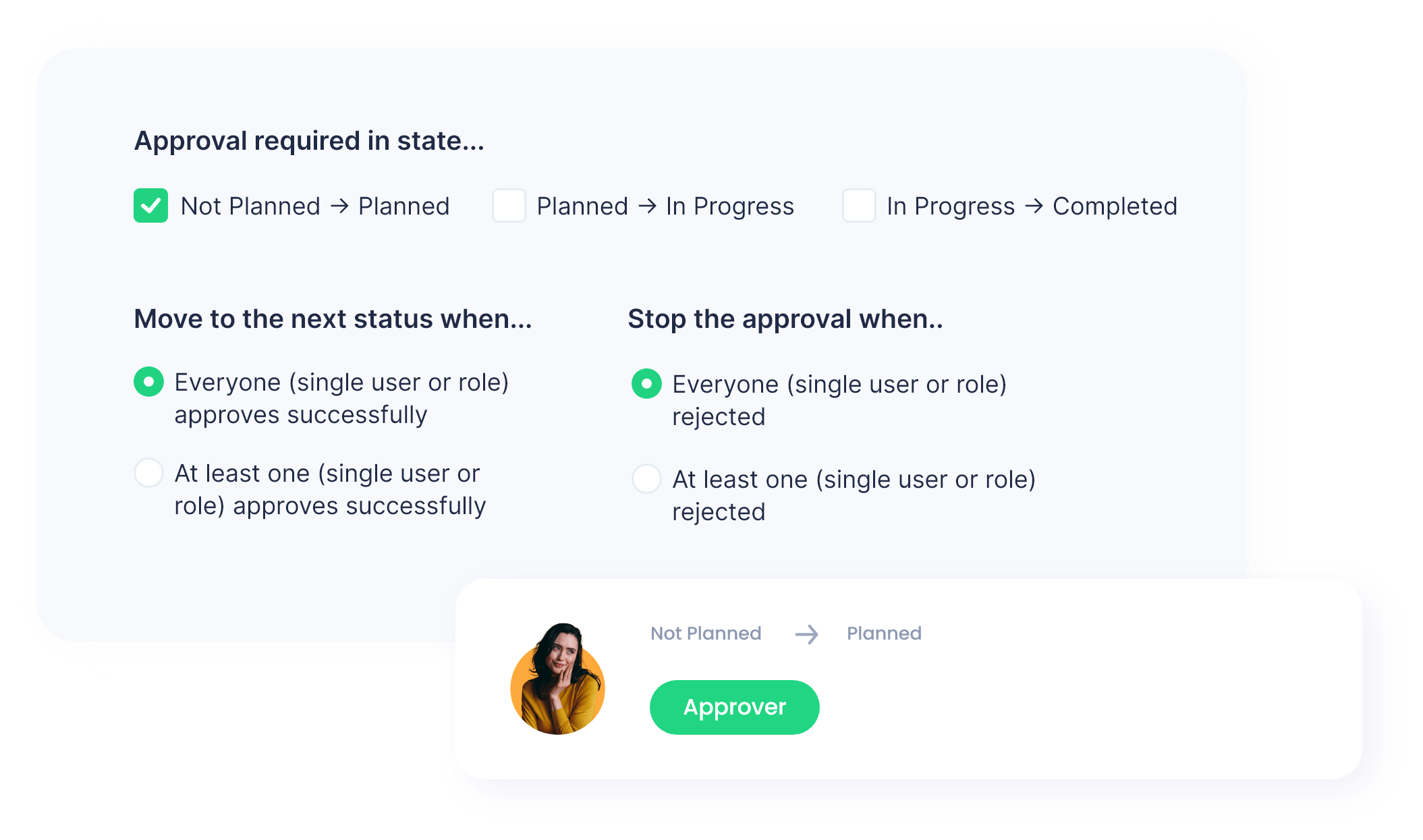 In Planally, automation:
- Advances the workflow when a phase is complete
- Routes approvals to the correct roles
- Sends notifications where attention is needed
- Escalates delays when work needs support
People make the decisions.
The workflow carries the movement.
Roles Shape Responsibility and Trust
Accountability should not rely on interpretation.
It should be built into the system.
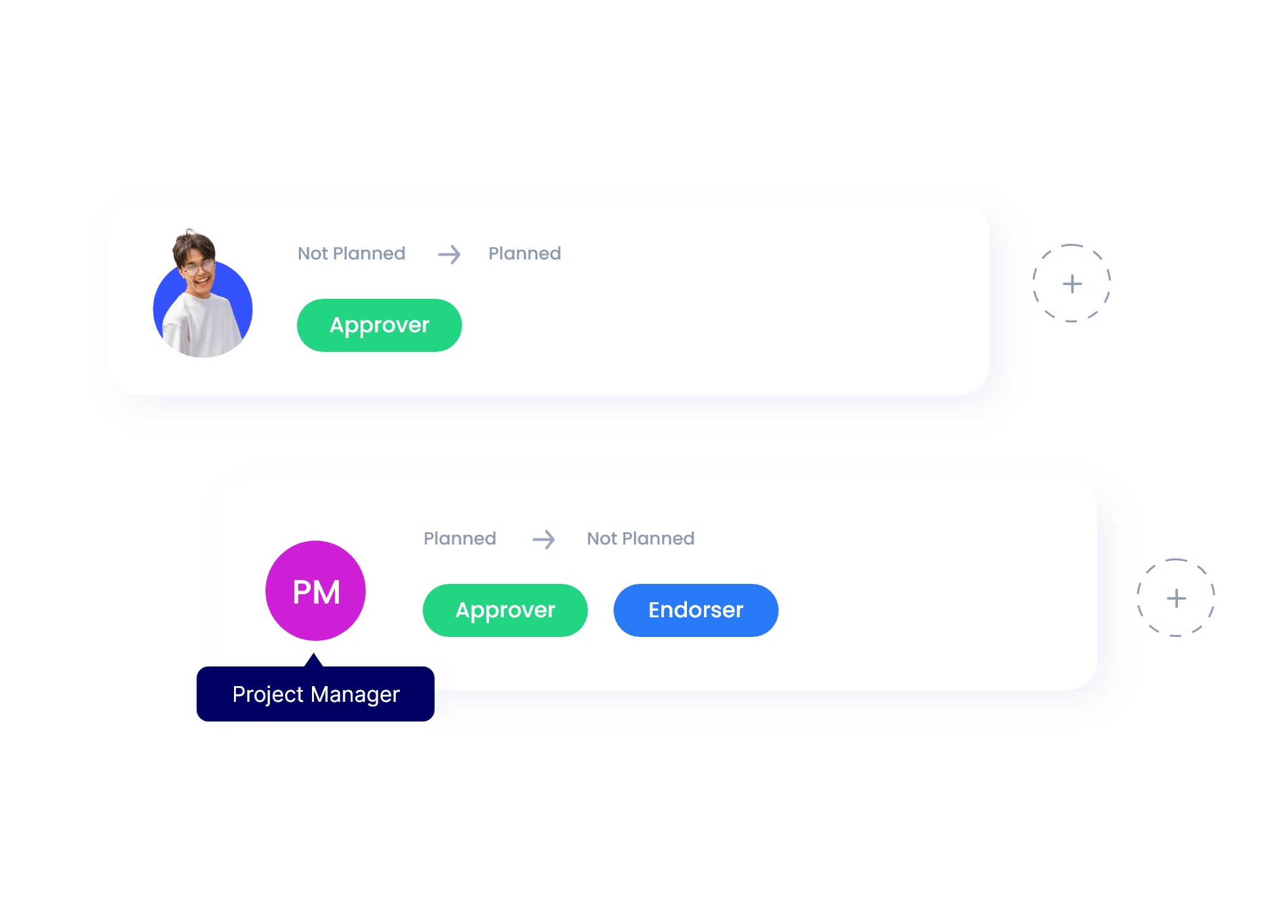
Planally assigns permissions and visibility based on defined roles.
Everyone sees what they are responsible for.
Everyone sees where work stands.
Nothing is assumed.
Nothing depends on memory.
Responsibility becomes shared understanding.
Visibility Enables Improvement Over Time
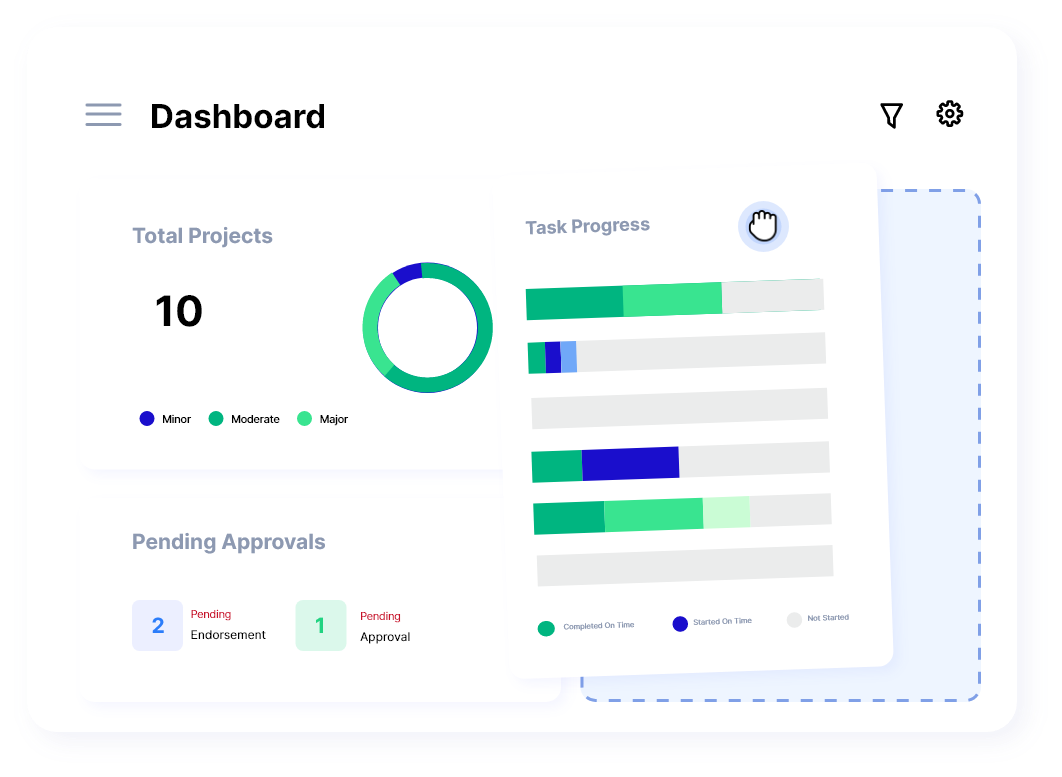
Once the workflow is running as a system, patterns become clear:
- Where work slows
- Where approvals accumulate
- Where documentation is unclear
- Where phase timing varies
Visibility makes improvement obvious.
 The workflow evolves with the organization.
Not through rework.
But through clarity.
How to Turn Any Process Into a Digital Workflow
Every workflow already has a logic.
It already moves through stages.
It already requires certain actions before progress can continue.
The shift to a process is not about changing the workflow.
It is about making the workflow visible, structured, and executable.
The process is straightforward.
Step 1: Identify the Real Phases of the Workflow
Start by describing how the workflow moves from start to finish.
Not the tasks.
The movement.
Ask one clear question:
“What changes when this phase is complete?”
This reveals the natural stages.
Examples:
- A contract moves from Evaluation to Approval.
- A procurement request moves from Sourcing to Purchase.
- An onboarding workflow moves from Documentation to Training.
Phases appear when progress changes state.
Write the phases down in order.
Do not overthink it.
Reality is already structured.
Step 2: Turn Those Phases Into a Workflow Roadmap
The phases now become the spine of the workflow app.
They are placed in sequence.
They show how work moves from beginning to completion.
This is the workflow roadmap.
The roadmap reflects how the workflow already behaves.
Nothing new is added.
Nothing is removed.
The workflow is now structured.
Step 3: Add the Activities Inside Each Phase
Inside each phase, identify the actions required to move the work forward.
Examples:
- Complete a form
- Upload or reference a document
- Review information
- Confirm compliance
- Request clarification
- Record a decision
Activities capture the work as it happens, inside the phase where it belongs.
No separate chats.
No scattered documents.
No searching.
The workflow holds its own information.
Step 4: Assign Roles and Accountability
Each activity requires someone responsible for moving it forward.
Assign that responsibility directly in the workflow.
Roles determine:
- Who acts
- Who reviews
- Who approves
- Who observes
Responsibility becomes structured, not implied.
Clarity removes delay.
It removes rework.
It removes assumptions.
Step 5: Automate Handovers, Notifications, and Approvals
Once activities and roles are in place, the workflow can move itself.
Automation advances the workflow when required steps are complete.
Notifications alert people when their attention is needed.
Approvals progress the workflow without manual follow-ups.
Coordination becomes part of the system.
Not part of someone’s memory.
Work flows because the workflow has momentum.
Step 6: Launch, Track, and Improve
Work progresses through the phases.
Activities capture the information where it belongs.
Roles ensure accountability.
Automation ensures movement.
Once the workflow is running, patterns become visible.
- Where work consistently slows
- Where decisions pile
- Where documentation needs clarity
- Where phase timing varies
Improvement becomes continuous.
Not a project.
Not a rework cycle.
A natural part of running the workflow.
Real-World Workflows, Before and After Digitalization
Workflows across organizations often look different on the surface.
Different departments.
Different terminology.
Different documentation.
Different stakeholders.
Yet underneath all of that, the structure is the same.
Work moves in phases.
Progress happens when something changes.
The workflow continues when the right actions are completed.
This pattern is universal.
The Universal Workflow Pattern
Most workflows follow one of these movement structures:
- Request → Review → Approval → Completion
- Intake → Evaluation → Decision → Execution
- Initiation → Work → Verification → Closure
This is the pattern that defines progress.
Not the tasks.
Not the tools.
The movement from one phase to the next.
Once this pattern is recognized,
it can be modeled into a digital workflow.
Now let’s see how that looks in real environments.
Procurement Workflow
Before:
- Request submitted in email
- Sourcing discussion in chat
- Vendor quotes stored in shared drive
- Follow-ups sent manually
- Approvals delayed because context is unclear
After:
| Phase | Movement |
| Request | Submit request form → auto-record in workflow |
| Sourcing | Compare vendors → attach documentation |
| Evaluation | Review criteria → data captured directly |
| Approval | Route to correct approver automatically |
| Purchase | Generate purchase order |
| Receipt & Payment | Complete and close workflow |
Progress becomes visible.
Approvals happen inside the workflow, not around it.
No one asks, “Where is this now?”
Contract Management Workflow
Before:
- Versions emailed back and forth
- Legal review timing unpredictable
- Stakeholders not sure of latest draft
- Final approval unclear
After:
| Phase | Movement |
| Initiation | Define contract scope |
| Tender | Collect proposals + upload documents |
| Evaluation | Compare terms + record notes |
| Negotiation | Track revisions + decisions in workflow |
| Delivery | Execute and track obligations |
| Closeout | Archive and handoff completion documents |
The workflow holds the process, not the people.
Employee Onboarding Workflow
Before:
- Forms shared through attachments
- Follow-ups repeated manually
- Training schedule unclear
- Manager alignment inconsistent
After:
| Phase | Movement |
| Offer Acceptance | Capture acceptance and start date |
| Documentation | Submit identity + compliance information |
| Training | Assign training tasks + track completion |
| First Week | Confirm equipment + meeting setup |
| Performance Readiness | Enable review and manager sign-off |
Every new hire experiences onboarding the same way, every time.
Consistency replaces memory.
Audit & Compliance Workflow
Before:
- Field notes collected in spreadsheets
- Evidence tracking inconsistent
- Reporting assembled manually
After:
| Phase | Movement |
| Planning | Define scope + assign leads |
| Fieldwork | Capture findings directly in workflow |
| Review | Route for internal review & verification |
| Reporting | Generate documentation for stakeholders |
| Closure | Record completion and store audit record |
Evidence is collected where the work happens, not after it.
Why Enterprises Prefer a Phase-Based Workflow System
As organizations grow, the challenge is not volume.
The challenge is consistency.
Work must move the same way across shifting teams, new hires, leadership changes, and evolving operational priorities. When workflows depend on memory, interpretation, or individual habits, consistency becomes difficult to sustain.
A phase-based workflow system provides a shared structure that does not depend on individual recollection or personal coordination.
It creates a common understanding of how work progresses.
This is why enterprises adopt systems that:
- Define progress clearly
- Make accountability visible
- Reduce reliance on informal knowledge
- Enable improvement based on observation, not assumption
The workflow becomes a shared language.
Everyone knows where the work is.
Everyone knows what needs to happen next.
Everyone understands how completion is reached.
This reduces uncertainty.
It reduces delay.
It reduces friction that is difficult to trace and expensive to manage.
Consistency Is Not Control — It Is Clarity
There is a difference between managing work and understanding how work moves.
Phase-based workflows do not restrict teams.
They support teams by holding the process steady, so collaboration does not depend on memory or personal reminders.
Consistency becomes stability.
Stability allows improvement.
Improvement compounds.
This is how organizations scale predictably.
Accountability Becomes Shared, Not Imposed
In phase-based workflows:
- Responsibility is clear by role
- Decisions are visible
- Work cannot silently stall
- Expectations are understood across departments
This shifts accountability from enforcement to understanding.
Teams know what they own.
Leaders see where support is needed.
Everyone moves with clarity.
Visibility Makes Better Decisions Possible
Once the workflow is running as a structured system, patterns appear.
Organizations can see:
- Where work reliably slows
- Where approvals accumulate
- Where documentation needs clarification
- How phase duration varies across teams or time
Visibility enables learning.
Learning enables meaningful change.
Change becomes manageable.
This is operational maturity — achieved through structure, not pressure.
The Shift Is Simple
The workflow moves from something that:
- Lives in documents
- Depends on memory
- Requires reminders
- Changes depending on who is involved
To something that:
- Lives in the system
- Guides itself
- Holds decision points clearly
- Runs consistently across teams
The workflow becomes an asset, not a coordination burden.
 The Future of Workflows Is Structural Clarity
Work has always moved through phases.
Teams have always relied on handoffs, reviews, approvals, and shared understanding.
The difference today is that work moves faster, across more teams, with more complexity, and higher expectations for visibility.
When workflows rely on memory, coordination becomes effort.
When workflows rely on the system, clarity becomes the default.
A phase-based workflow system does not change what the work is.
It changes how the work moves.
The workflow holds itself.
The structure guides progress.
The system carries the weight that people previously had to manage.
Teams spend less time asking where things stand.
Less time repeating steps.
Less time following up.
Less time repairing misalignment.
And more time doing the work that creates value.
Organizations do not benefit from adding more tools.
They benefit from making the movement of work clear.
This is where digital workflows become:
- Reusable
- Scalable
- Understandable
- Observable
- Easy to improve
Not because the workflow changed.
But because its structure did.
This is how consistency becomes culture.
How clarity becomes collaboration.
How improvement becomes continuous.
The workflow becomes something the organization can rely on.
 When You’re Ready
If you’d like to see how one of your workflows will look in Planally— we can walk through it together.
No pitch.
No pressure.
Just clarity.
We take one workflow you already run today, map its phases, and show how it moves when the system holds the process instead of the people.
If that’s something you’d like to explore:
It starts with a conversation.
It continues with clarity.
And from there, the workflow runs the work.
Fequently Asked Question
What is a digital workflow?
A digital workflow is a structured system that guides work through defined phases, activities, roles, and approvals. It ensures the workflow moves consistently, without relying on memory.
How is a digital workflow different from a task or project tool?
Task tools track what needs to be done. A digital workflow guides how work moves from phase to phase. It holds the structure of the workflow itself.
Do I need to redesign my workflows to use Planally?
No. Planally models the workflow as it already exists. The system reflects your real process; it doesn’t force new methods.
Can non-technical teams build digital workflows in Planally?
Yes. Planally is fully no-code. Teams define phases, activities, and roles directly — no technical configuration is required.
How does automation work in phase-based workflows?
Automation moves work forward when required steps are complete, routes approvals, and notifies the right people at the right time.
Which process benefits most from being turned into a digital workflow?
Any workflow with handoffs, approvals, reviews, or compliance requirements benefits — including procurement, contracting, onboarding, audit, and R&D.
What changes after implementing a digital workflow?
Work becomes consistent, progress becomes visible, responsibility becomes clear, and improvement becomes easier.
How do I get started?
Begin with one workflow. Map its phases, define activities, assign responsibilities, and observe how clarity emerges.
Get in Touch: https://planally.com/contact/